

In this blog, we will deploy a dockerized angular application to EKS using Jenkins. We will use AWS Elastic Container Repository to store the docker build images.
Prerequisites:
- A running EKS cluster.
- Jenkins running on the master node.
- Docker running on Jenkins instance.
- Dockerfile for angular application.
Step1: Create an ECR repository
- Login to your AWS account and go to the ECR console.
- Click Create Repository.
- Provide a name to the repository.

- Now go to the IAM dashboard and click Create user.
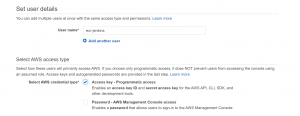
- Select programmatic access as access type.
- Select EC2InstanceProfileForImageBuilderECRContainerBuilds policy.

- Click Next and Create user.
- Copy Access Key ID and Secret Access Key.
Step2: Setup Jenkins
- Login to your Jenkins server.
- Go to Manage Jenkins-> Manage Plugins and install the following plugins- CloudBees AWS Credentials, Docker, Docker Pipeline, GitHub, Kubernetes, and Kubernetes CLI.
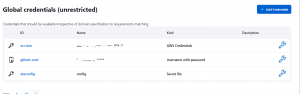
- Next, go to Manage Credentials->Add Credentials.
- Select the kind as AWS credentials, give an ID, and enter the Access key ID and Secret key of the ECR-Jenkins user that we created.

- Next, add credentials for GitHub. Select kind a username and password and add your GitHub username and auth token.
- Next, we need to add credentials for the Kubernetes cluster. Go to your master node and copy the content of Kubernetes config file in a different file. Use the following command in the master node.
sudo cat ~/.kube/config
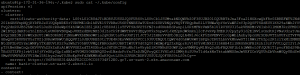
- Click on add credentials and select kind as secret file. Upload the config file.

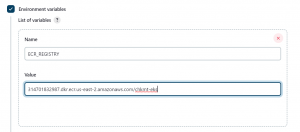
- Now go to Manage Jenkins->Configure System. Add an environment variable for ECR registry URL.
Step3: Create Jenkins Pipeline
- Add the deployment manifest file and Jenkinsfile to your GitHub root directory.
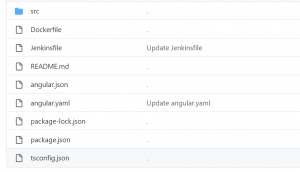
- Here angular.yaml contains the deployment manifest.
apiVersion: apps/v1
kind: Deployment
metadata:
 name: angular-app
 labels:
   app: angular
spec:
  replicas: 2
  selector:
    matchLabels:
        app: angular
  template:
    metadata:
      labels:
        app: angular
    spec:
     containers:
      - name: angular-app
        image: ${REPOSITORY_TAG}
        imagePullPolicy: Always
        ports:
        - containerPort: 80

---

apiVersion: v1
kind: Service
metadata:
   name: angular-service
spec:
  type: LoadBalancer
  selector:
   app: angular
  ports:
  - targetPort: 80
    port: 80
- Follwing is the Jenkinsfile.
pipeline {
    agent any
    options {
        skipStagesAfterUnstable()
    }
    environment {
     REPOSITORY_TAG = "$ECR_REGISTRY:$BUILD_NUMBER"
     }
    stages {
         stage('Clone repository') {
            steps {
                script{
                checkout scm
                }
            }
        }

        stage('Build') {
            steps {
                script{
                    sh  'docker build -t ${REPOSITORY_TAG}  -f Dockerfile .'
                }
            }
        }

        stage('Push to ECR') {
            steps {
                script{
                        docker.withRegistry('https://$ECR_REGISTRY', 'ecr:us-east-2:ecr-iam') {
                            sh 'docker push ${REPOSITORY_TAG}'

                    }
                }
            }
        }
       stage('K8S Deploy') {
         steps{
            script {
                     withKubeConfig([credentialsId: 'eksconfig', serverUrl: '']) {
                         sh 'envsubst < ${WORKSPACE}/angular.yaml | kubectl apply -f -'
                }
            }
         }
       }
    }
 }
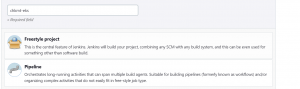
- Next click on Create New item and select pipeline.
- Select Pipeline Script from SCM and Git as SCM.
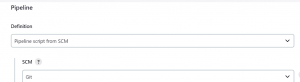

- Select the Script path as Jenkinsfile.
- Apply and save. Click Build Now
.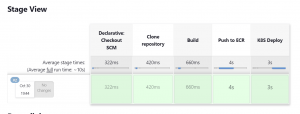
- The pipeline has run successfully.
- Go to your EKS master node and use the following command.
kubectl get svc

- Copy the Load Balancer IP and use it to access your application from the browser.
Please contact our technical consultants if you are any IT solutions related to cloud infrastructure .
