

MySQL is one of the most used relational database managements (RDMS) based on SQL, it stores data in rows and columns each row will have unique data for the defined columns, and every RDMS follows a predefined schema to store data, use a relational database management system when you want your data to be stored in a particular predefined schema.
When to use MongoDB?
MongoDB is a non-relational document database used to store unstructured data, it has flexible data model as it allows you to store data in Json format, it uses collections and documents unlike tables and rows in relational database, documents consist of key-value pairs which are mongo dB’s basic unit of data, fields in a MongoDB document can be indexed with primary and secondary index’s.
while MongoDB is more flexible and ensures data availability ,MySQL ensures greater reliability of transactions ,so if you have a application where there is a need to perform complex queries and you do not intend to add more features it’s better to stay on MySQL, on the other side ,if you are constantly adding new features and functionalities to your application it’s better to migrate to MongoDB.
In this blog we will see a very simple way of migration where you export tables from mysql-workbench and mysql command line to csv files, and importing a csv file to mongodb.
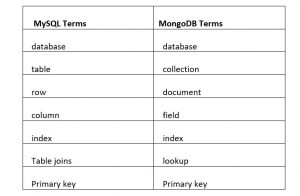
MySQL to MongoDB terminology mapping chart
Exporting tables using MySQL workbench to a CSV file
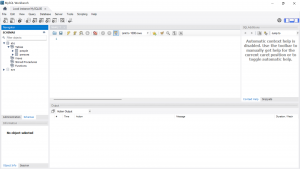
On your MySQL workbench click on “Schemas” under navigator.
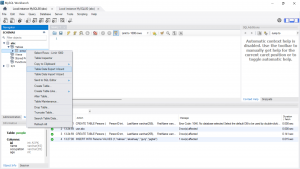
Select the database from which you want to export table and right click on the table name then click on “Table Data Export Wizard” as shown in below snap shot, I am exporting table people from database “abc” .
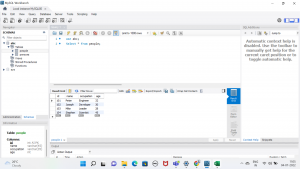
data of table “people” from abc database.
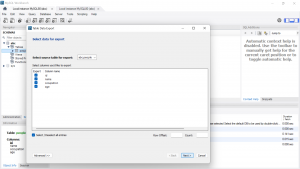
Now select the columns that you want to export and click on next.
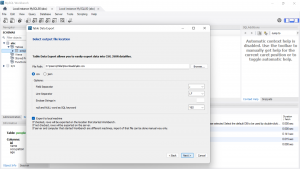
give file path where you want to store data and select the file type then click on “Next>”, as you can see , I am saving my file in downloads.
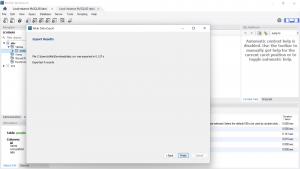
click on Next on “Export Data” tab and click on ‘Finish’ on Export Results tab.
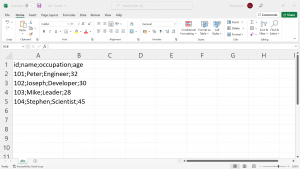
Now go check your csv file in file path you gave, below is the snapshot of the file generated.
Exporting table from MySQL Command line (Server)
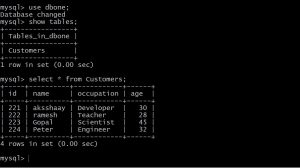
Below is the snapshot of a table data “Customers” from a database named dbone
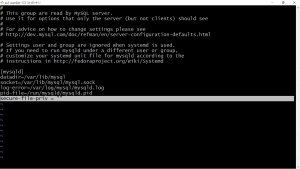
To export your table from command line you need to add below line to mysql-server configuration file under [mysqld] and save it.
secure-file-priv = ""
This will enable users to export or import data from database server, restart your mysql server after saving the file.
Command to export a table to a csv file
Login to your mysql shell and use below command to export your table.
TABLE Customers INTO OUTFILE 'Customers.txt' FIELDS TERMINATED BY ';' LINES TERMINATED BY '\n';

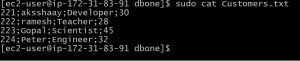
here Customers is the table name that I want to export and Customers.txt if the file name to which I am exporting the table file will be created at /var/lib/mysql/database_name (may vary based on OS), you can also give a specific path instead of file name , below is snapshot of CSV file(exported table data) column names are not exported here.
Importing a CSV file to MongoDB database using mongoimport command
you can use mongoimport command to import CSV files it’s fast and multi threaded
Example-1: Importing a CSV file which does not has field names
Now lets see how to use mongoimport command to import a CSV file which does not have header (column/field names), below is the snapshot of data in a csv file named Customers.

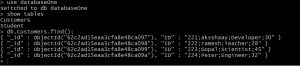
As you can see in the below image database “databaseOne” only has one table.

execute below command on your terminal to import data from a csv file (not on mongo shell).
mongoimport --db databaseOne --collection=Customers --file=Customers.csv --type=csv --fields="ID","Name","Occupation","Age"
Here databaseOne is database that I am importing data to ,Customers is the new collection created to store imported data, Customests.csv is the CSV file name that the data is imported from and use option fields to give field names.
Example-2: Importing a CSV file which has field names
Observe the below given snapshot of abc.csv file it has field names, use option headerline along with mongoimport command, option headerline notifies mongoimport that not to import first line as document as it contains field names.

Command to import data into mongodb from csv file with header
mongoimport --db databaseOne --collection=Persons --file=abc.csv --type=csv --headerline
databaseOne is database that I am importing data to ,Persons is the new collection created to store imported data, abc.csv is the CSV file name that the data is imported from.

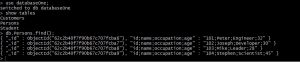
Snapshot of collection created from imported file
Please contact with our technical consultants if you want to develop any cloud migration strategy. Our cloud engineers can provide you appropriate infrastructure migration plan. You can hire Checkmate Global Technologies cloud engineer today.
