

Ansible Handlers are tasks that are run when they are called by another task using Notify. It is useful when you want to run a task in response to some changes.
Handlers are defined globally using the handlers keyword. The tasks that need to call handlers have to define it with notify keyword. If no task call handlers then they will not run.
The use-case of the handlers can be understood with an example.
In the following playbook, we are installing httpd service and copying the configuration file from our machine to the remote node. Now if the configuration file is copied we want to restart the httpd service. We have defined it using notify keyword. We have defined the restart httpd task with the handlers keyword.
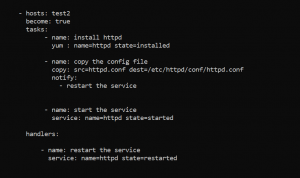
Grouping of handlers: A single task can be used to notify multiple handlers. In the following playbook, we are notifying two tasks together.
One thing to note here is that handlers run in the order in which they are defined, not in the order in which they are written in notify statement.

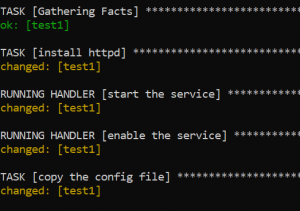
Changing the flow of handler execution: By default handlers run after, all the tasks in the playbook have been executed. If we want to change this flow and run the handler before the end of the play we can use the meta module.

At the time of running of the playbook, we can see that handler is running before the copy task.
Using variables with ansible handlers: Placing variables in the handler name should be avoided as it could lead the complete play failure because handler names are templated in starting so sometimes ansible may not have a value available for handler name like the following playbook.

Instead, variables should be placed in the task parameters like in the following playbook.

Connect with our DevOps team to know about DevOps management strategies.
